The Complete Guide to Making WeChat Stickers: From Cutout to Chat in 3 Minutes
The Two Kinds of WeChat Stickers
WeChat — China's most-used messaging app — has two kinds of stickers: chat stickers, which you add for personal use with no review required, and sticker albums, which are published on the WeChat Sticker Open Platform and can earn you tips. This tutorial covers the first kind — you can be using your own sticker in about three minutes.
Making a Chat Sticker (the Fastest Method)
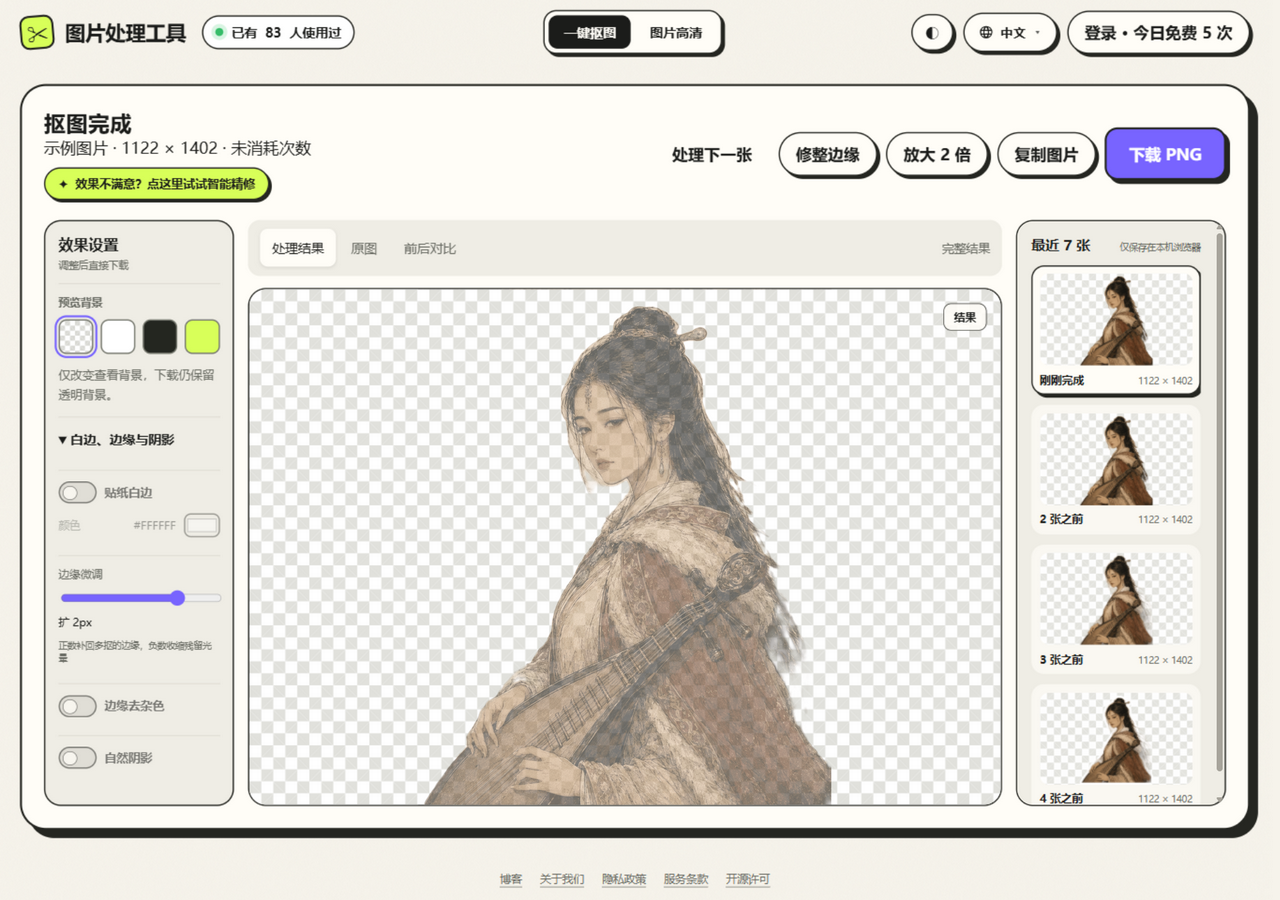
Step 1: Prepare Your Material
- A photo of a person, pet, or cartoon character
- Front-facing, well lit, and with a simple background works best
- The more exaggerated the expression, the better — stickers live on emotion
Step 2: Remove the Background
- Open JuanJuan Tools
- Upload the photo and wait 3–5 seconds for the automatic cutout
- Check the edges — if anything is left over, fix it with Smart Refine
Step 3: Add the White Border
- Turn on Sticker Border in the effects panel on the right
- Adjust the width — 3–4% gives the classic sticker look
- Keep the color white for the classic sticker style
Step 4: Download and Add to WeChat
- Click "Download PNG" and save it to your phone or computer
- In WeChat, send the image to any friend (or to File Transfer Helper, WeChat's built-in chat for sending files to yourself)
- Long-press the image → tap "Add to Stickers"
- You'll find it in your sticker panel from now on!
Level Up: Combine It with a Shadow
Beyond the white border, you can also switch on Natural Shadow to give your sticker more depth. Recommended settings: opacity 25–35%, softness 2–3%, distance 1–2%.
Making a Sticker Album (Publish and Earn Tips)
If you want your stickers used by more people — and to earn tips from them:
- Register a creator account on the WeChat Sticker Open Platform (sticker.weixin.qq.com)
- Prepare 16 or 24 sticker images, each 240×240px, as transparent PNGs
- Keep a consistent style and theme across the whole set
- Submit for review (usually 3–7 business days)
- Once approved, the album goes live — anyone can use it for free and send you tips
Sticker Design Tips
- Big subject: stickers render in a small window, so the subject should fill 70%+ of the frame to stay readable
- White border is a must: it keeps the sticker visible on any chat background
- Think in series: one character with 16 different expressions is more appealing than 16 different characters
- Clear emotion: joy, speechlessness, rage, shock — a sticker's core job is to convey feeling
FAQ
Q: Is there a size limit for stickers?
Chat stickers have no strict limit (240×240px or larger is recommended). Published sticker albums require each image to be 240×240px and under 500KB.
Q: Can I make stickers from celebrities or anime characters?
Personal chat use is generally fine, but publishing a sticker album requires copyright authorization. Stick to your own photos or original characters.